From an established ERP to a specialist billing application, begin with your existing data and processes. Araiqa Fawtara provides the integration destination; the connection method is scoped around your application, invoice types and operational needs.
ERPPOSAccountingE-commerceCustom applications
THE CONNECTED PICTURE
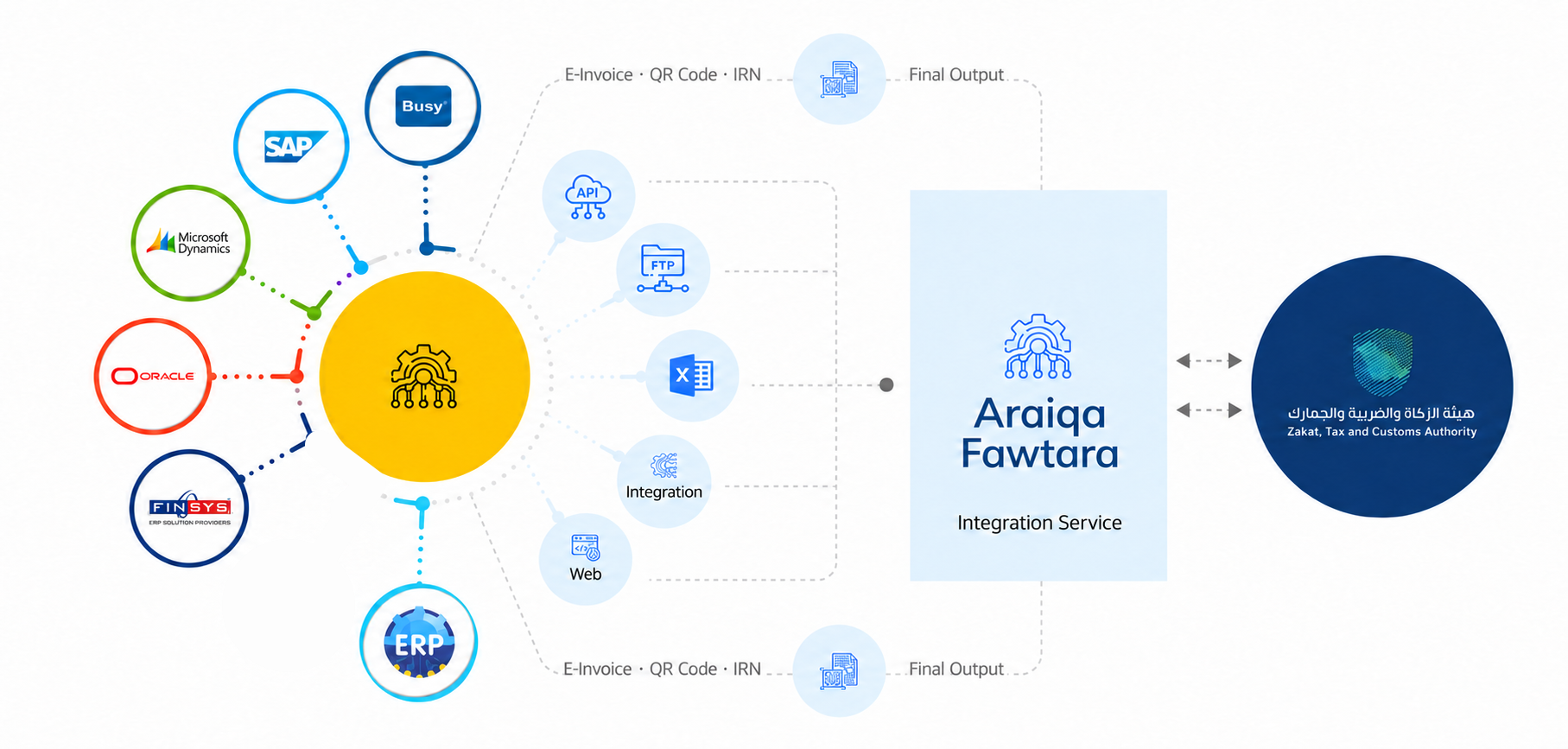
Different systems. One e-invoicing journey.
Supplied ecosystem diagram, shown at its original proportions. Logos illustrate source-system examples, not certified partnerships or ready-made connectors. IRN means Invoice Reference Number in this diagram; it does not replace ZATCA’s required identifiers or clearance/reporting processes.
FLEXIBLE BY DESIGN
Choose the connection. Keep the control.
A starting point for your integration discussion—not a promise that every connector is preconfigured.
</>
For teams with developer access
Connect invoice events directly from your application.
Map your invoice fields, authenticate requests and return processing status to your source system. Agree the payload, retry policy and callback behaviour during implementation.
Move structured invoice batches from existing systems.
Use an agreed file structure and secure transfer channel such as SFTP, where supported. Validate each record and reconcile the results back to the original batch.
Start with a familiar, structured import template.
Prepare invoice data using an agreed template. Review missing fields and validation messages before submitting the batch through the configured e-invoicing workflow.
An assisted route when direct integration is not available.
Discuss a web-based invoice entry and review workflow with the Araiqa team. Confirm the available features, permissions and invoice types before enabling it for your business.
Design the connection around your operational reality.
Review the data interface of your POS, commerce, industry or in-house application. Scope a connector only after confirming technical access, data quality and supported business scenarios.
Three stages, with the right checks before you go live.
Search the workspace…
EnglishWorkspace userAccount access
Dashboard
General settings
Administration
Master records
Inventory
Purchasing
Accounts payable
Sales management
Accounts receivable
E-invoices⌄
E-invoice overview
E-invoice details
Sync details
Import invoices
Customer records
Workspace / E-invoices
Import invoicesPrepare and review a sample invoice batch.
+New import
BUSINESS UNITExample company⌄
BRANCHSample branch⌄
Invoice code
Invoice list
Created date
Status
Actions
DEMO-L01
Sample batch 1
2026-01-12
Draft
DEMO-L02
Sample batch 2
2026-01-11
Review needed
DEMO-L03
Sample batch 3
2026-01-10
Draft
DEMO-L04
Sample batch 4
2026-01-09
Draft
Workspace · synchronization status
Product workflowInvoice synchronization workflow
01
Discover & map
Review your source system, invoice fields, expected volume and access. Agree the integration method and responsibilities.
02
Connect & validate
Configure the agreed workflow, complete applicable onboarding and test invoice scenarios, failures and reconciliation.
03
Launch & monitor
Move to production only after sign-off. Monitor processing status and keep a clear route for corrections and support.
DESIGNED AROUND THE INVOICE LIFECYCLE
More clarity. From source to status.
01
Source-system mapping
Agree how customers, tax, line items and identifiers move from your application.
02
Validation before submission
Surface missing or inconsistent data early, with actionable correction messages.
03
The appropriate ZATCA workflow
Distinguish standard invoice clearance from simplified invoice reporting.
04
Status & reconciliation
Plan status updates and reconcile outcomes with your originating application.
05
A considered rollout
Confirm permissions, credentials, supported scenarios and operational ownership.
Your business. Your way of connecting.
SAUDI CONTEXT. CLEAR EXPECTATIONS.
Compliance is a workflow. Not just a logo.
The production integration needs the appropriate ZATCA onboarding, invoice formats and tested clearance or reporting flow. Regulatory approval depends on completing these requirements.
Not necessarily. Start with a technical review of your current system and its invoice data. The suitable connection depends on the interfaces it exposes and the scope agreed with Araiqa.
Is every ERP supported out of the box?
No universal connector is implied. The ecosystem diagram illustrates integration approaches and examples of source systems; connector availability and any third-party permissions must be confirmed.
What happens if an invoice is rejected?
Plan for validation messages, a clear status history, correction and controlled resubmission. The exact retry and reconciliation behaviour should be tested with your chosen integration.
Are standard and simplified tax invoices handled the same way?
No. ZATCA distinguishes clearance for standard tax invoices from reporting for simplified tax invoices. Confirm the applicable workflow, onboarding and tests before production.
How do we begin?
Share a sample invoice structure without personal or confidential production data, your source application details and expected volume. Your team and Araiqa can then agree the connection method and implementation scope.
Get started with Araiqa
Contact us to learn about pricing, deployment options, or request A Demo


 Your business. Your way of connecting.